
问题描述h2
在使用 Git 克隆项目时,出现以下报错:
fatal: unable to access 'https://github.com/xxx/xxx.git':Failed to connect to github.com port 443: Connection refused
这个问题通常是因为代理设置不正确导致的,需要为 Git 配置正确的代理。
解决方案h2
方法一:设置 HTTP 代理h3
端口号与你使用的代理软件有关,常见端口如下:
| 代理软件 | 默认端口 |
|---|---|
| Clash | 7890 |
| Clash Verge | 7897 |
| v2rayN | 10808 |
| SSR | 1080 |
以 Clash Verge(端口 7897)为例:
git config --global http.proxy http://127.0.0.1:7897git config --global https.proxy http://127.0.0.1:7897
方法二:设置 SOCKS5 代理h3
如果 HTTP 代理不生效,可以尝试 SOCKS5 代理:
git config --global http.proxy socks5://127.0.0.1:7897git config --global https.proxy socks5://127.0.0.1:7897验证配置h2
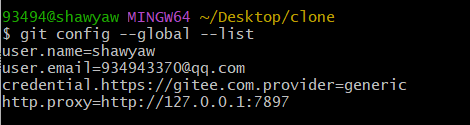
检查代理是否设置成功:
git config --global --list配置中出现 http.proxy 和 https.proxy 则代表设置成功:
取消代理h2
如果需要取消代理设置:
git config --global --unset http.proxygit config --global --unset https.proxy
评论